
Short answer: “Validate signature error” in Trust Wallet (or TronLink) means the TRON wallet you are sending from no longer lets your key sign transactions. Its permissions were changed so that another address, or several addresses (multi-signature), must approve every transfer. In most cases you were given the seed phrase of a “loaded” wallet as bait, and the USDT in it can never be withdrawn.
Roman Urdu mein: Is error ka matlab hai ke is TRON wallet ki permission kisi aur address ke paas hai. Aap ki seed phrase se transaction sign nahi hoti. Agar kisi ne aap ko “USDT wala wallet” ki seed phrase di hai to yeh scam hai. Fees ke liye TRX bilkul na bhejein.
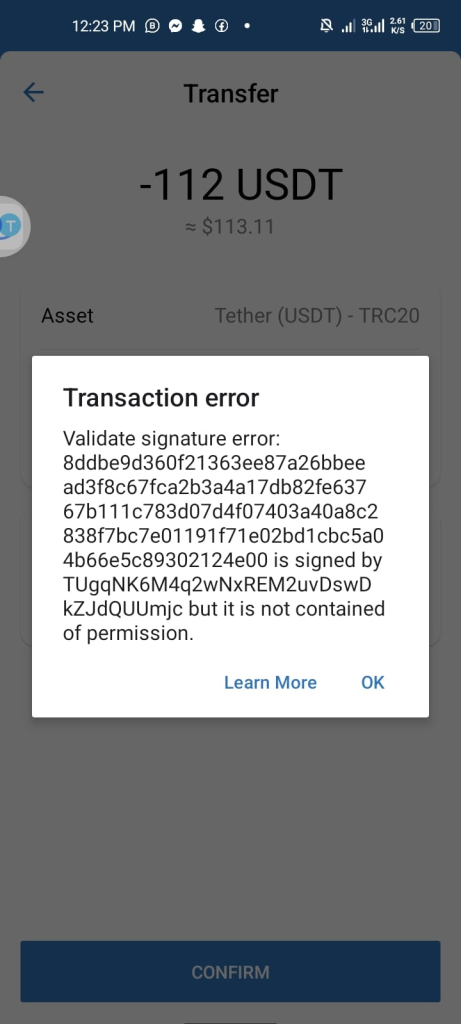
The full message usually looks like this:
Transfer failed - Validate signature error: [signature] is signed by [your address] but it is not contained of permission.
Why Trust Wallet Shows This Error
Every TRON account has an owner permission and active permissions that list which keys may sign. A normal wallet has just one key: yours. The account owner can change this so that other addresses must sign, or so that a set number of signatures is needed (for example 2 of 3). That is a multi-signature setup.
When you press Send, Trust Wallet signs with the key from your seed phrase. The TRON network checks the permission list, sees that your key isn’t on it (or isn’t enough on its own), and rejects the transaction with “is not contained of permission”.
The “Free USDT Wallet” Scam Behind Most Cases
We see this error posted again and again in the Cryptocurrency Pakistan Facebook group, and almost every time it comes from the same scam:
- Someone “accidentally” posts a seed phrase in a comment, chat or YouTube video, or asks for help withdrawing their funds and offers you a share.
- You import it into Trust Wallet and see thousands of USDT.
- You try to send it, but you need TRX for the network fee (energy/bandwidth), so you deposit TRX.
- The transfer fails with “Validate signature error”, because the scammer had already moved the wallet’s permission to their own address. Your TRX is then swept out by the scammer, or stays stuck in the wallet.
The USDT is bait. Nobody can withdraw it with the seed phrase you were given, and paying for “unlocking” or “permission fixing” services only loses more money.
How to Check a Wallet’s Permissions
- Copy the wallet address (starts with T).
- Search it on Tronscan and open the Permissions tab.
- Look at the owner and active permission. If the keys listed are not your address, or the threshold needs more than one signature, your seed phrase alone can’t move funds.
Can It Be Fixed?
- If it was a seed phrase someone shared: no. Stop, don’t send any TRX, and delete the wallet from your app.
- If it is your own wallet and you never set up multisig: your seed phrase has been stolen and the attacker changed the permissions. Only the address that now holds the owner permission can undo it. Create a brand-new wallet with a new seed phrase, move anything you still can (other chains on the same seed phrase may still be reachable), and find out how the phrase leaked. See clipboard hijacking and wallet malware.
- If you set up multisig yourself: collect the other required signatures (for example in TronLink’s multisig feature) and the transfer will go through.
What Is a Multi-Signature Wallet?
A multi-signature (multisig) wallet needs more than one key to approve a transaction, for example 2 of 3 keys. Businesses use it so no single person can move funds, and it protects you if one key is stolen. The downside is convenience: every payment needs the other signers, and you must keep several seed phrases or keys safe. Ordinary Trust Wallet accounts are single-signature, which is why the error surprises most people.
Frequently Asked Questions
Does “validate signature error” mean Trust Wallet is down?
No. It is a rejection from the TRON network based on the account’s permissions, not an app bug. Updating or reinstalling Trust Wallet won’t change it.
Will adding more TRX for fees fix it?
No. Fees are a separate issue. Adding TRX to a wallet you don’t control is exactly what the scammer wants.
Validate signature error ka matlab kya hai?
Wallet ki permission kisi aur address ke paas hai, is liye aap ki seed phrase se transfer sign nahi hota. Shared seed phrase wala wallet scam hota hai.
For any queries or discussion, join our socials or post in the Cryptocurrency Pakistan Facebook group.